Is It Safe to Install APK Files? 8 Essential Checks Before You Tap Install
Ask most websites is it safe to install apk files and you get the same answer: yes, as long as you download from a trusted source. That advice is written for people who go looking for an APK. It completely misses how risky APKs actually arrive on Indian phones — you do not go to them, they come to you, as a WhatsApp forward from a relative, a Telegram channel post promising an earning app, or a QR poster promising a sign-up bonus.
When the file is pushed at you, the “trusted source” rule never even gets a chance to apply. This breakdown covers the threat model those global articles skip: how these files spread here, the permissions that should end the conversation instantly, what Google Play Protect really does with sideloaded apps, and the eight checks worth running before you tap install.
What an APK File Actually Is, and Why It Skips the Usual Checks
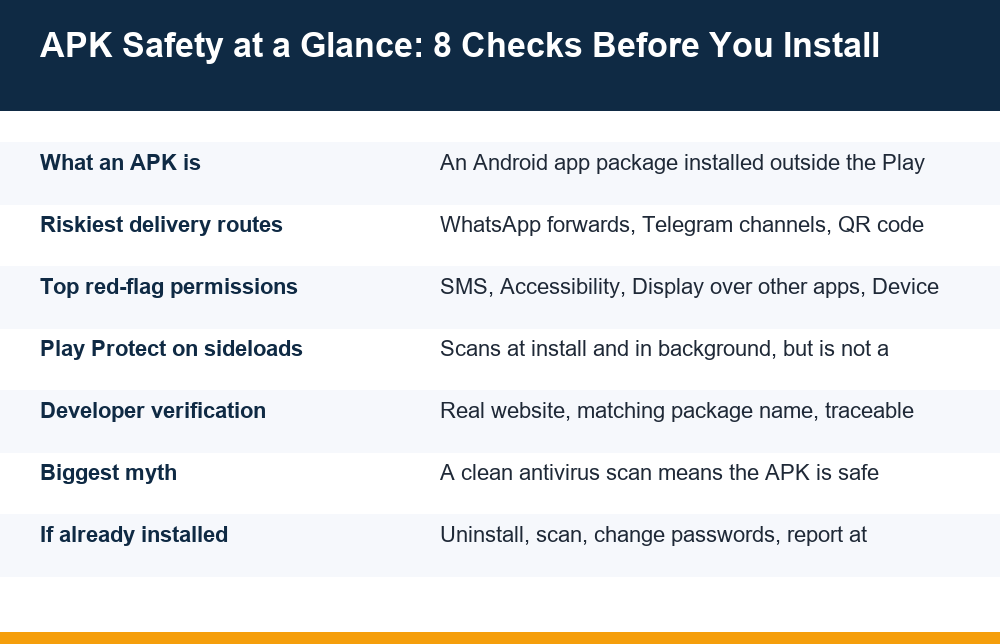
An APK (Android Package Kit) is the raw installer file for an Android app — the same kind of package the Play Store delivers, except handed to you directly as a file. When you install an app from the Play Store, Google runs the package through automated malware analysis, verifies the developer’s registered identity, enforces policy rules about what the app may request, and signs off on updates. When you install an APK yourself — called sideloading — every one of those layers disappears at once.
That is the core trade. The file format itself is not dangerous; an APK is just a container, the way a .zip file is a container. What changes is who vouched for the contents. On the Play Store, Google did, imperfectly but systematically. With a sideloaded APK, nobody did. The entire burden of answering who built this, what does it do, and what will it ask for moves onto you, in the thirty seconds between receiving the file and tapping install.
There is one more technical detail most pages gloss over: Android apps are identified by package name and signing key, not by their icon or display name. A fake app can copy a real app’s name, logo and screenshots perfectly. It cannot copy the original developer’s signature. This is why several of the checks below focus on identity rather than appearance — appearance is the one thing a scammer can fake for free.
WhatsApp Forwards, Telegram Channels and QR Posters: How Risky APKs Reach You
Global articles about APK safety assume you searched for the file. In India, the dangerous path runs the other way. Malicious APKs are distributed through channels where social pressure or a money hook does the convincing before you have looked at the file at all. The common delivery routes share one feature: each one arrives with a reason to hurry.
- WhatsApp forwards — an APK sent in a family or colony group, often framed as a banking update, a government scheme app, a wedding invitation file, or an earning app a relative claims to use. The sender usually received it the same way and has no idea what it contains.
- Telegram channels — channels pushing gaming and earning apps distribute APKs directly in the chat, often with screenshots of supposed payouts. The channel admin controls the file and can swap it for a different build at any time.
- QR code posters and stickers — codes pasted in markets, on shop counters or shared as images, promising a bonus for scanning. The QR resolves to a direct APK download, skipping even a webpage you could inspect.
- Fake download pages — sites styled to look like an official app page, reached through a shortened link in an SMS or a social media ad.
- “Premium unlocked” versions — modified APKs of paid or freemium apps, where the modification is precisely the part you cannot inspect.
The money angle matters because it changes behaviour. Someone forwarding a wedding-invitation APK is careless; someone pushing an earning app APK has an incentive — referral commissions, or outright fraud. If a file promises income for installing it, treat that promise as the first red flag, not a feature. We have covered how to tell a real earning app from a fake one separately, and the overlap with APK distribution is almost total: fake earning apps live outside the Play Store because they would not survive inside it. One honesty note while we are here: where these files push real-money gaming, that is 18+ territory and losing money is the expected outcome, whatever the channel screenshots claim.
Is It Safe to Install APK Files? The 8 Checks Before You Tap Install
So, is it safe to install apk files at all? The honest answer is conditional: it can be acceptably safe when you control where the file came from and verify what it is — and it is never safe when the file was pushed to you by someone with a reason to want it installed. These eight checks, in order, separate the two cases. If any single check fails, stop; there is no combination of passing the others that cancels a failure.
- Check how the file reached you. Did you deliberately go looking for it, or did it arrive via a chat, QR code or ad? Pushed files fail this check by default. This one filter alone screens out the delivery routes that scam operations rely on most.
- Ask why it is not on the Play Store. Legitimate reasons exist (covered below), but the app’s own site should state one plainly. No stated reason, no install.
- Verify the developer independently. Search the developer’s name yourself, in a fresh browser tab, not through links inside the message that delivered the file. A real developer has a traceable footprint: a working website, a support contact, other products.
- Compare the package name. The package name (like
com.company.appname) is visible in file-manager app inspectors and in Settings after install. Fakes typically use misspelt or padded variants of the real one. - Scan the file before opening it. Let Google Play Protect scan it at install time, and optionally upload the file to a multi-engine scanner from your computer. Treat a detection as final — and treat a clean result as merely ‘not caught yet’, not proof of safety.
- Read the requested permissions before granting any. The red-flag list in the next section is short, specific and non-negotiable.
- Check the file size against the official app. A 4 MB file claiming to be a full banking or gaming app, or a 300 MB ‘update’, deserves suspicion either way.
- Confirm your Android version still gets security updates. Sideloading onto a phone that stopped receiving patches years ago multiplies the damage any malicious app can do.
Notice what is not on this list: ‘download from a trusted mirror site’. Mirror sites can be useful to technically experienced users, but recommending them as the fix teaches the wrong lesson — that safety lives in the source rather than in verification. A correctly signed, verified package is checkable; a reputation is just a feeling.
Permission Red Flags: What a Sideloaded App Should Never Ask For
Permissions are where the real answer to is it safe to install apk files gets decided, because permissions are what convert a suspicious file into actual harm. Malware does not steal money through clever code alone — it does it through access you granted in two careless taps. The table below lists the permissions that should end an install immediately when requested by a sideloaded app that has no obvious need for them.
| Permission | What it actually allows | Why it is a red flag in a sideloaded app |
|---|---|---|
| Read / receive SMS | Reads every incoming text, including bank OTPs | Among the most abused permissions in APK fraud; in this context it exists almost solely to intercept OTPs |
| Accessibility service | Can read the screen and perform taps on your behalf | Lets an app operate other apps — including UPI apps — as if it were you |
| Display over other apps | Draws invisible or fake layers on top of real apps | Used to overlay fake PIN screens on genuine payment apps |
| Device admin / device owner | Deep control, can resist uninstallation | Makes removal deliberately difficult; no chat-delivered app needs it |
| Install unknown apps | Lets this app install further apps silently | A downloader for payloads that arrive after you stop paying attention |
| Notification access | Reads the content of all notifications | A quieter route to the same OTPs that SMS permission exposes |
Two notes on reading this table fairly. First, context decides: an SMS app legitimately needs SMS access; a game or an ‘earning’ app never does. Second, Accessibility deserves special fear. Genuine accessibility tools serve users with disabilities; when a random sideloaded app requests it, it is asking for the keys to everything on the screen, including the ability to approve transactions. Android itself warns loudly during this grant — the scam scripts know this, which is why their instructions walk victims through dismissing the warning step by step. Any install instruction that tells you to ignore a system warning is a confession.
Does Google Play Protect Scan Sideloaded Apps?
Yes — and this surprises people on both sides of the question. Google Play Protect is not limited to Play Store downloads. On certified Android devices it scans apps at install time regardless of where they came from, runs periodic background scans of everything installed, and can warn about or disable apps it identifies as harmful. When you sideload an APK, you will often see a prompt offering to scan the app before it installs; in some cases Play Protect sends unknown apps for a deeper check before allowing installation.
So when people ask is it safe to install apk files as long as Play Protect is on, the answer is: safer, not safe. Play Protect’s limits are structural. It recognises known malware families and suspicious behaviour patterns, but a freshly built scam APK — compiled this week for a campaign targeting this month’s victims — may simply not be in anyone’s detection set yet. Fraud APKs are often rebuilt in short-lived batches precisely to stay ahead of scanners. Play Protect is also sometimes the scammer’s target: a standard line in scam scripts is instructing the victim to switch Play Protect off ‘because it blocks the bonus app’. That instruction, like the accessibility warning above, is a confession in plain text.
The practical position: keep Play Protect on, let it scan every sideload, and treat its approval as one passed check out of eight — never as the verdict. A scanner can only tell you an app resembles known bad apps. It cannot tell you whether the unknown app in front of you is honest.
How to Verify the Developer Before Installing Anything
Developer verification is the check that scammers find hardest to fake, which is exactly why so few people are taught to do it. Icons, names, screenshots and five-star testimonials cost nothing to copy. A years-long, consistent, independently searchable identity does not. The verification takes five minutes and requires no technical skill.
Start outside the message that brought you the file. Open a browser yourself and search the app name plus the developer name. A legitimate developer surfaces in multiple independent places: their own website with a working domain (not a free subdomain created last month), a Play Store listing for their other apps, a support email that matches their domain, and some history — releases, changelogs, mentions over time. A fraudulent operation surfaces in one place: the channel that sent you the file, plus perhaps a single-page site registered recently with no contact route beyond a Telegram handle.
Then match identities. If the developer does have a Play Store presence, compare the package name of your APK against the package name on their store listing — they should be identical, character for character. Check that the website the APK’s install page claims actually links back to the same app. Circular references (the channel vouches for the site, the site vouches for the channel) count as zero sources. And if an app claims affiliation with a bank, a government scheme or a well-known brand, go to that organisation’s real website directly and look for the app there; genuine organisations list their official apps. A claimed affiliation you cannot confirm from the organisation’s own site should be read as false.
Why Is the App Not on the Play Store but Available as an APK?
This is the question that decides most real-world cases, so it deserves a straight treatment. There are legitimate reasons for an app to live outside the Play Store: some apps distribute directly to avoid store fees, some are in regional or early-access rollouts, some categories of real-money apps are not carried on the Play Store in certain regions as a matter of store policy, and some open-source apps publish through their own sites on principle. Direct distribution is how some well-known apps operate, and anyone asking is it safe to install apk files deserves a more honest answer than ‘only store apps are real’.
But here is the asymmetry that matters: a legitimate developer distributing outside the store will tell you why, in writing, on a site you can verify. The reason will be specific and checkable. A fraudulent app has a reason too — it could not pass review, or it needs permissions no store would allow, or it plans to change behaviour after install — and that reason is never stated. So the test is not ‘is it off-store?’ but ‘does the developer openly own the fact?’. Silence on the question is itself the answer.
Be especially careful with the claim ‘this app was removed from the Play Store, so get it here’. Sometimes true, and when true it should make you more cautious, not less — removal usually means a policy or safety problem. The earning-app niche leans on this line constantly, pairing it with payout screenshots. We looked at that pattern in detail in our breakdown of what earning apps in India actually pay in 2026: the apps that genuinely pay small amounts are overwhelmingly the ones you can get through the store, and the APK-only ‘high payout’ tier is where the complaints concentrate.
SMS, OTPs and What to Do If You Already Installed One
The sharpest fear behind this topic is the right one: yes, a malicious APK can give someone access to your SMS and OTPs, and that access is the bridge from ‘bad app on my phone’ to ‘money gone from my account’. The mechanics are mundane. If the app got SMS or notification access, it forwards your incoming OTPs to the operator in real time. If it got accessibility access, it can go further and act inside your UPI or banking app directly, reading the screen and performing taps. None of this requires exotic hacking — only the permissions granted during a hurried install.
If you suspect an APK you installed is malicious, act in this order. Speed matters most in the first hour:
- Cut the network first. Switch on flight mode or turn off Wi-Fi and data. Most malicious apps are useless without a connection to report back through.
- Uninstall the app. Settings → Apps → find it → uninstall. If the uninstall button is greyed out, the app took device-admin rights: remove those first under Settings → Security → Device admin apps, then uninstall. Check the full app list, not just your launcher — droppers hide their icons, which is also why a phone can feel inexplicably full; our piece on storage that stays full even after deleting files covers how to spot apps and data you cannot see from the home screen.
- Revoke what it touched. Review Accessibility, Notification access, and ‘Display over other apps’ lists and remove anything you do not recognise.
- Run a Play Protect scan from the Play Store menu, and restart the phone.
- Change passwords and PINs from a different device — email first, then UPI and banking PINs. Assume anything typed on the infected phone was visible.
- Watch your accounts and report. If money moved or OTPs were intercepted, report it immediately through the national cybercrime portal and your bank’s fraud line. For ongoing device hygiene, the Indian government’s Cyber Swachhta Kendra publishes plain-language security best practices covering mobile and desktop safety.
- Factory reset if anything resists removal. An app that reappears, or admin rights that cannot be revoked, end the debate — back up photos and documents only (not apps), and reset.
Pulling it all together: is it safe to install apk files? It is a controllable risk when you sought the file out, verified the developer, matched the package name, read the permissions and kept Play Protect on — and it is an uncontrolled one the moment any of those steps is skipped because a chat message made the app sound urgent, lucrative or exclusive. The file format was never the danger. The delivery pressure is. An app worth installing will still be worth installing after five minutes of checking; the ones that cannot survive five minutes of checking were never apps at all.
Frequently Asked Questions
Are APK files from WhatsApp or Telegram safe to install?
Treat them as unsafe by default. Files pushed through chats fail the most basic safety condition: you did not choose the source, someone chose you. WhatsApp forwards and Telegram channel APKs are a major distribution route for fraudulent earning, gaming and fake-banking apps in India, and the sender in a family group usually has no idea what the file contains. If the app is genuine, you will be able to find it yourself through the developer’s verifiable official site — install it from there or not at all.
How do I check an APK file for viruses before installing?
Keep Google Play Protect enabled so it scans the file at install time, and for extra assurance upload the APK to a multi-engine online scanner from a computer before transferring it to your phone. Interpret the results asymmetrically: any detection means delete the file, but a clean result only means no scanner recognises it yet — brand-new scam APKs can pass scans for days. Pair scanning with the non-technical checks: verify the developer, compare the package name, and read the requested permissions.
Why is the app not on the Play Store but available as APK?
Legitimate reasons exist: some developers distribute directly to avoid store fees, some apps are in regional rollouts, certain real-money app categories are not carried by the store in some regions, and some open-source projects self-publish. The test is transparency — a genuine developer states the reason openly on a site you can verify. A fraudulent app also has a reason (it could not pass review, or needs permissions no store allows) and never states it. If no one will tell you why it is APK-only, that silence is your answer.
What permissions should an APK never ask for?
For a typical sideloaded app — a game, an earning app, a utility — the hard red flags are: read/receive SMS (OTP interception), Accessibility service (lets the app read your screen and tap inside other apps, including UPI apps), display over other apps (fake PIN overlays), device admin (resists uninstallation), install unknown apps (silently installs further payloads) and notification access (reads OTPs from notifications). Context matters — an SMS app needs SMS access — but when an app has no obvious need for one of these, the request itself is the warning.
Does Google Play Protect scan sideloaded apps?
Yes. On certified Android devices, Play Protect scans apps at install time regardless of source, runs periodic background scans of everything installed, and can warn about or disable harmful apps. It may also offer a deeper pre-install check for unknown APKs. Its limit is that it detects known malware families, so a freshly compiled scam APK can pass. Keep it on, let it scan every sideload, and treat its approval as one passed check rather than proof of safety — and treat any instruction to switch it off as a confession of bad intent.
Can installing an APK give someone access to my SMS and OTP?
Yes, if the app obtains SMS or notification access it can forward your incoming OTPs to the operator in real time, and with Accessibility access it can act directly inside banking and UPI apps by reading the screen and performing taps. This permission chain, not sophisticated hacking, is how most APK-based financial fraud works. If you suspect it has happened: cut the network, uninstall the app (removing device-admin rights first if needed), revoke its permissions, change passwords from another device, and report promptly through the national cybercrime portal and your bank.
