UPI Transaction Failed but Money Debited: 7 Proven Steps to Get Your Money Back
A upi transaction failed but money debited moment is instantly recognisable: you scanned a QR code or sent money to a UPI ID, the app showed a red failed screen — and then your phone buzzed with a debit SMS. It is one of the most common payment problems in India, and the frustrating part is that advice online contradicts itself: one page says the money comes back in an hour, another says 24–48 hours, a third says 3–5 working days, and each one quietly routes you into a particular app’s support chat. This page takes the app-neutral route instead.
It lays out, in strict order, what to check, which number to save, how long to genuinely wait, how to file a bank complaint that actually gets tracked, and how to escalate when nobody responds. Most of these cases resolve on their own — but the ones that do not are almost always the ones where the person skipped a step, paid twice, or lost the reference number. Follow the sequence below exactly as written.
What Actually Happened: Failed on Screen, Debited in the Account
A UPI payment is not one event. It is a chain: your UPI app sends the request, your bank debits your account, the NPCI switch routes the instruction, and the receiver’s bank credits the beneficiary. The app then waits for a confirmation to travel all the way back. When any link in that chain times out — the receiver’s bank is slow, the switch is congested, your network drops for two seconds — the app gives up waiting and shows failed, even though your bank already completed its part and debited you.
So the error screen and the debit SMS are both telling the truth about different links in the chain. The money has left your account, but it is sitting in transit: either it will still reach the beneficiary late, or it will bounce back to you automatically. Which of the two happens is decided by the banks’ settlement process, not by anything you tap in the app. That is why the first real step is to find out the actual status, not the status the error screen showed you.
There are three possible real outcomes, and everything you do next depends on which one you are in.
- Deemed success: the money reached the receiver a few seconds or minutes late. The app history later updates to success. Nothing is owed to you.
- Failed with auto-reversal: the credit never happened, and the debited amount is automatically returned to your account, usually the same day.
- Stuck: the debit stands, no credit happened, and no reversal has arrived within the normal window. This is the only case that needs a complaint.
Note one more distinction before moving on: this page covers a payment that failed in transit. If the payment succeeded but went to a UPI ID you did not intend, that is a different problem with a different process — see the separate breakdown of what to do when money is sent to the wrong UPI ID.
Before Anything Else: Do Not Pay Again
This warning belongs at the top because it is where the real financial damage happens. A failed-but-debited payment almost always comes back. A second payment made in panic does not come back — it is a genuine, successful payment, and if the first one also turns out to be a deemed success, you have now paid twice and must recover the duplicate from the merchant or receiver, which is far harder than waiting for an automatic reversal.
The pressure to pay again is strongest at a shop counter or a petrol pump, with a queue behind you and a merchant who has not seen the credit. Hold the line. Show the merchant the failed status and the debit SMS, offer an alternative (cash, card, a different account) if the purchase cannot wait, and keep the first transaction untouched until its status is final.
Be equally careful of a newer trap: after a visible payment failure, some people receive a call from someone claiming to be from the app or bank, offering to “reverse” the stuck money if you approve a collect request or share an OTP. No bank processes reversals that way. A reversal is a credit — it never requires you to approve anything, enter a PIN, or read out a code.
If such a call follows your failed payment, treat it as an attempted fraud and report it on the Government of India’s National Cyber Crime Reporting Portal or its helpline 1930. If the caller’s story involved an OTP that never arrived or arrived strangely, the related breakdown of OTP delivery problems and what they signal is worth reading.
UPI Transaction Failed but Money Debited: The 7 Steps in Order
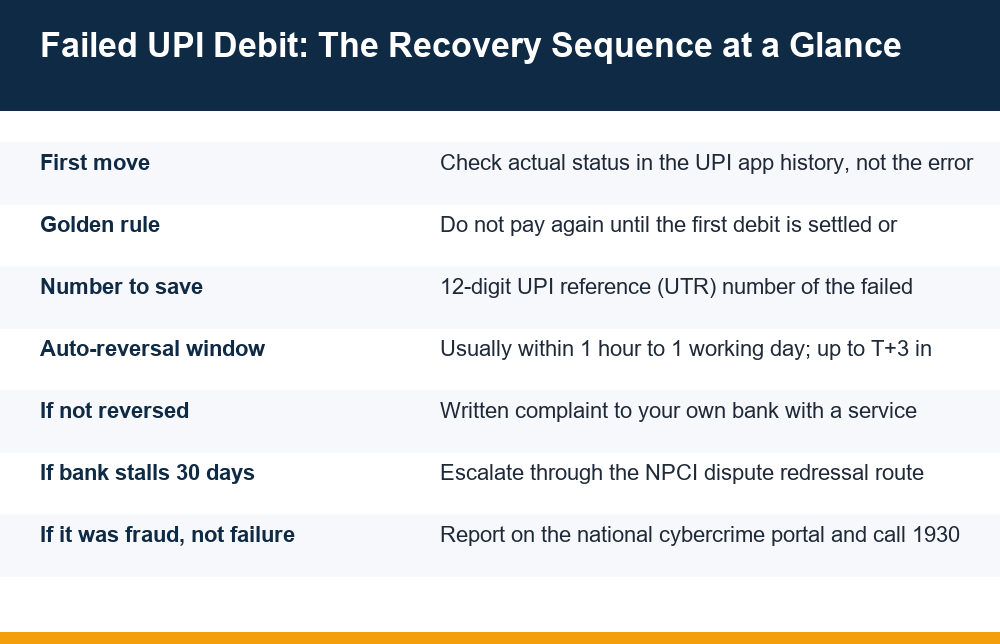
Here is the whole sequence for a upi transaction failed but money debited case, in the order that protects you best. Each step is expanded in the sections that follow; this is the map.
- Check the real status in your UPI app’s transaction history, not on the error screen. Pull-to-refresh or reopen the app; pending and failed are different states.
- Confirm the debit against your bank account statement or passbook entry, not just the SMS. An SMS can arrive for an authorisation that is later dropped.
- Save the UPI reference number (the 12-digit UTR) of the failed attempt, plus a screenshot of the transaction detail page and the debit entry.
- Do not repeat the payment for the same purpose until the first one is finally settled or reversed.
- Wait the standard window — most reversals land within a few hours to one working day. Check your account, not the app, for the credit.
- Complain to your own bank (the account that was debited) if the reversal has not arrived by the end of the window, and insist on a service request number in writing.
- Escalate through the NPCI dispute route if the bank’s resolution stalls past 30 days, using the same reference number and complaint trail.
Two things about this order matter. First, the complaint goes to your bank — the debiting bank — not to the receiver’s bank and not primarily to the app, because the money was taken from your account and your bank owns that debit. Second, every later step reuses the evidence from step 3, which is why saving the reference number early is not optional.
How to Find the UPI Reference Number That Every Complaint Needs
Every UPI transaction, successful or failed, is stamped with a 12-digit number called the UPI reference number or UTR (Unique Transaction Reference). This number is how your bank, the receiver’s bank and NPCI all identify the same transaction. A complaint without it forces the bank to hunt by date and amount, which adds days; a complaint with it can be traced in minutes.
Where it appears
- In the UPI app: open the transaction history, tap the failed payment, and look on the detail page for “UPI Ref No”, “UTR”, or “Reference ID”. Every mainstream UPI app shows it there.
- In the debit SMS: many banks include the UTR directly in the debit alert message.
- In the bank statement: the narration of the debit entry usually carries the UTR, often after a prefix like “UPI/”.
- In the app’s share option: tapping share or download receipt on the transaction produces an image or PDF that includes the number — useful as evidence in itself.
Save it three ways: screenshot the detail page, copy the number into a note, and keep the debit SMS. If the transaction later disappears from the app view (rare, but it happens after app reinstalls), the SMS and the bank statement still carry it. Also note the exact date, time, amount and the receiver’s UPI ID or name as shown — the complaint form will ask for all of them.
Refund Timelines Compared: What to Expect and When
This is where pages across the internet contradict each other — one quotes “instant”, another “24–48 hours”, another “3–5 working days”. They are all describing different layers of the same process, so here are the layers separated honestly. “T” means the transaction date; “T+1” means the next working day.
| Stage | Typical window | What is actually happening |
|---|---|---|
| Status settles (success or failed) | A few minutes to a few hours | The banks reconcile whether the credit went through; the app history updates from pending to a final state |
| Automatic reversal | Within hours, generally by T+1 | The debited amount is returned to your account without any action from you |
| Delayed auto-reversal | Up to T+3 working days | Reconciliation between banks takes longer, often around month-end load or bank system downtime |
| After a bank complaint | Commonly within 7–10 working days | The bank traces the UTR manually and forces the reversal through |
| NPCI escalation stage | After 30 days unresolved | The dispute moves above the bank’s own process |
Three honest caveats. These are typical operational windows, not promises — a specific bank pair on a specific day can be faster or slower. The reversal credit sometimes arrives without the app status ever updating, so check your bank account balance or statement rather than staring at the app. And weekends and bank holidays stretch every “working day” figure, which is how a Friday-night failure can honestly take until Tuesday or Wednesday without anything being wrong.
The practical rule in any upi transaction failed but money debited case: give it one full working day before escalating. Complaining two hours after the failure wastes your time, because the bank’s first response will be “wait for auto-reversal” anyway. Complaining after T+1 with the UTR in hand puts you straight into the traced-complaint queue.
Raising the Complaint With Your Bank the Right Way
If the reversal has not reached your account by the end of the waiting window, the complaint goes to the bank whose account was debited. You can raise it through the UPI app’s help section too — and it is fine to do both — but the bank complaint is the one with formal weight, because it starts a clock and generates a trackable number.
Use whichever channel your bank offers: phone banking, the bank’s own mobile app or net-banking complaint section, or a branch visit. Whatever the channel, the complaint should state the same facts in the same shape: the date and time of the transaction, the amount, the 12-digit UTR, the receiver’s UPI ID as shown in the app, the status the app displayed, and the fact that the debit stands with no reversal received as of today’s date.
The service request number is the whole point
Before the call or chat ends, get the service request number (also called a complaint number, SR number or ticket number) and write it down with the date you raised it. This number is what converts “I called the bank” into a traceable dispute. Without it, a follow-up call starts from zero; with it, any agent can pull the case. If a branch takes the complaint on paper, ask for an acknowledgement with a number on it. If a channel refuses to issue any number, use a different channel — the absence of a reference is a sign the complaint was never logged.
From this point, follow up on the same SR number rather than opening new complaints. Multiple parallel complaints about one UTR genuinely slow banks down, because each one is investigated separately and they can close one as “duplicate” — which looks, in their system, like a resolution.
One adjacent situation is worth separating: if the debit that surprised you is recurring — a mandate pulling money every month rather than a one-time payment that failed — the fix is not a complaint but ending the mandate itself, covered step by step in how to cancel a UPI autopay mandate.
Escalating to NPCI When the Bank Does Not Resolve It
NPCI — the National Payments Corporation of India — operates the UPI network, and it maintains a dispute redressal mechanism for exactly this situation: a UPI complaint that the bank and app channels have not resolved. It is an escalation layer, not a first stop, and it works best when used in sequence.
- First level: the UPI app’s help/dispute section for the specific failed transaction.
- Second level: your bank’s formal complaint with a service request number, as above.
- Third level: the NPCI dispute redressal route, raised online against the same transaction, quoting the UTR and the bank complaint number.
- Fourth level: if roughly 30 days pass from your first complaint without resolution, the matter can be taken to the banking ombudsman mechanism for digital transactions, again with the full paper trail.
The reason the sequence matters is practical: the NPCI form asks what the app and the bank already said, and the ombudsman stage asks for the complaint numbers and dates from the earlier levels. Every level feeds the next. This is also why the single most valuable habit in this whole process is boring record-keeping — one note holding the UTR, the screenshots, the SR number, and the dates on which you raised and followed up each complaint.
Keep expectations calibrated: the overwhelming majority of failed-but-debited cases never get past the auto-reversal stage, and most of the remainder close at the bank-complaint stage. The escalation ladder exists for the small tail of cases that fall through — and for those, it genuinely works better than repeatedly calling the app’s support line.
Why UPI Payments Fail Even When You Have Balance
Balance is only one of several things that must be true at the same moment for a UPI payment to go through. When a upi transaction failed but money debited incident happens repeatedly, one of these is usually the recurring cause.
- Bank server load or downtime: the most common cause by far. Your bank’s or the receiver’s bank’s UPI systems time out under load — typically at month-end, on salary days, or late evening. Nothing on your side is wrong.
- Network drop at the wrong second: the payment instruction went out, the confirmation never came back to your phone. These are the classic failed-on-screen, debited-in-account cases.
- UPI daily limits: caps on amount per transaction and per day, and on the number of transactions. Crossing one mid-day makes an otherwise normal payment fail.
- Wrong PIN entered too many times: temporarily blocks UPI on that account even though balance is fine.
- Receiver-side problems: the beneficiary’s account is frozen, closed, or their bank is offline. Your bank may debit first and reverse when the credit bounces.
- Stale app state: an outdated app version or a cached session can produce failures that disappear after an update or re-login.
The pattern worth noticing: almost none of these are things you can fix by retrying immediately. If the cause is server load, the retry fails too — or worse, both eventually succeed. When a payment fails, a short wait is not just patience, it is the correct technical response.
Mistakes That Delay Your Refund
Looking across how upi transaction failed but money debited cases actually go wrong, the delays are rarely caused by the banks alone. These are the user-side mistakes that reliably add days or convert a recoverable situation into a loss.
- Paying again immediately — the most expensive mistake, covered above. Wait for a final status first.
- Losing the reference number — uninstalling the app, deleting the SMS, or never opening the transaction detail page. Save the UTR the moment the failure happens.
- Complaining to the wrong party — pursuing the receiver’s bank or only the app’s chat support, when the formal complaint belongs with your own debiting bank.
- Not taking a service request number — a complaint without a number is, operationally, a complaint that never happened.
- Opening multiple overlapping complaints — duplicates get closed as duplicates, and that closure can mask the real case.
- Trusting a reversal phone call — anyone who calls offering to reverse your stuck money and needs your PIN, an OTP, or a collect-request approval is not your bank.
- Judging by the app instead of the account — the reversal credit often lands while the app still shows failed. The bank statement is the source of truth.
A closing word on perspective. A failed debit feels alarming because the money visibly left, but structurally it is the most recoverable UPI problem there is — the system is built to reverse it, and the escalation ladder exists for the exceptions. The cases that end badly are almost always the panic cases: the double payment, the shared OTP, the lost reference number. Work the sequence, keep the records, and the odds are strongly on your side.
And since some readers land here after losing money on real-money gaming or earning apps: those debits follow the same rules when a transaction genuinely fails, but money lost in play is not a failed transaction — real-money play is for adults only, carries real risk, and losses are its expected outcome.
Frequently Asked Questions
How long does it take for a failed UPI transaction to be refunded?
Most auto-reversals reach the account within a few hours and generally by the next working day (T+1). Reconciliation delays can stretch this to around T+3 working days, and weekends or bank holidays extend every window. If nothing has arrived after one full working day, raise a complaint with your own bank quoting the 12-digit UPI reference number; traced complaints commonly resolve within 7–10 working days.
What should I do if money is debited but the transaction shows failed?
When a UPI transaction failed but money debited from your account, go in order: check the real status in the app’s transaction history, confirm the debit in your bank statement, save the 12-digit UPI reference (UTR) number with screenshots, do not pay again, wait up to one working day for the automatic reversal, then complain to your debiting bank and insist on a service request number. Escalate through the NPCI dispute route only if the bank’s process stalls.
Can I complain to NPCI about a failed UPI payment?
Yes, but as an escalation, not a first stop. NPCI’s dispute redressal mechanism is meant for cases the app’s help section and your bank’s formal complaint have not resolved. Raise it against the specific transaction, quoting the UTR and your bank’s service request number. If roughly 30 days pass from the first complaint without resolution, the matter can go further to the ombudsman mechanism for digital transactions.
Why do UPI transactions fail even when I have balance?
Balance is only one requirement. Common causes include bank server load or downtime (especially month-end and evenings), a network drop after the debit but before confirmation, daily UPI amount or transaction-count limits, too many wrong PIN attempts temporarily blocking UPI, problems on the receiver’s side such as a frozen account, and outdated app versions. Most of these are not fixed by retrying immediately.
Should I pay again if my UPI payment failed but money was deducted?
No — not until the first transaction reaches a final status. A failed-but-debited payment is usually reversed automatically, but a second payment is a real, successful payment. If the first one later settles as a delayed success, you have paid twice and must recover the duplicate from the receiver, which is much harder than waiting. At a counter, show the failed status and the debit SMS and offer another payment method instead.
How do I find my UPI transaction reference number?
Open your UPI app’s transaction history, tap the failed payment, and look for “UPI Ref No”, “UTR” or “Reference ID” on the detail page — a 12-digit number. It also usually appears in the bank’s debit SMS and in the statement narration of the debit entry, often after a “UPI/” prefix. Save it as a screenshot and a copied note; every bank and NPCI complaint will ask for it.
