SIM Swap Fraud: 6 Honest Warning Signs Your Mobile Number Is Being Hijacked
Your phone has shown No Service for two hours, nobody else in the house has an outage, and restarting changes nothing — that is exactly what SIM swap fraud looks like from the victim’s side. While your handset sits silent, a duplicate SIM registered against your number is live in someone else’s phone, quietly receiving every OTP your bank, UPI app and email send. Most Indian explainers of this fraud are translated from Western articles about foreign carriers and miss how it actually plays out here: the fake “KYC update” call, the eSIM conversion trick, the 1930 helpline. This breakdown covers the six warning signs that matter, why the first half hour decides how much you lose, and the exact order of calls to make.
How SIM Swap Fraud Starts in India
A SIM swap does not begin at your phone. It begins at your telecom operator, where someone convinces the system — or a person inside it — that they are you and need a replacement SIM. Once the operator activates that duplicate SIM, your original card goes dead, because a mobile number can only live on one SIM at a time. From that moment, every call, SMS and one-time password meant for you lands on the fraudster’s handset instead.
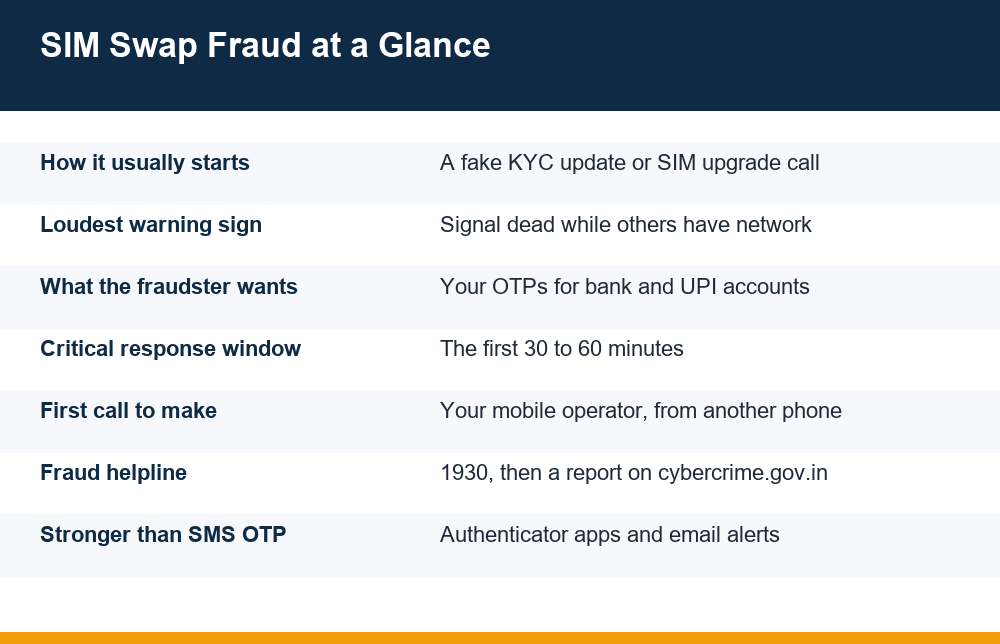
In India, SIM swap fraud usually opens with a phone call or SMS dressed up as routine telecom housekeeping. The caller claims to be from your mobile operator and says your KYC is incomplete, your SIM is being deactivated within 24 hours, or you are eligible for a free upgrade to a 5G SIM or an eSIM. The script always has two ingredients: urgency, and a request for you to either share an OTP or forward a specific SMS to a number they dictate. That forwarded SMS or spoken OTP is often the actual SIM replacement or eSIM activation request — you are unknowingly authorising the swap yourself.
The second route is quieter. The fraudster walks into a retail outlet with forged identity documents — or uses stolen personal details collected earlier through phishing pages, data leaks or fake part-time job offers that harvest ID proofs — and requests a duplicate SIM claiming the original was lost. If the verification is careless, the swap happens without you receiving a single call. This is why the fraud can hit people who never answered a suspicious call in their life.
The eSIM variant deserves its own mention because it removes the physical step entirely. The fraudster triggers an eSIM conversion request on your number, and the confirmation link or code comes to you. One moment of trust — tapping a link because the SMS looks official — moves your number onto an eSIM profile in their device. No store visit, no forged Aadhaar copy, no human contact at all.
6 Warning Signs Your Number Is Being Hijacked
No single sign proves SIM swap fraud on its own, but each one deserves a check, and two together deserve immediate action. In rough order of how the fraud unfolds:
- A ‘KYC update’ or ‘SIM upgrade’ call that asks you to act right now. Genuine operators do not deactivate SIMs on a 24-hour ultimatum delivered by a random caller, and they never need you to read out an OTP or forward an SMS to complete verification.
- An SMS about a SIM change or eSIM request you never made. Operators send a confirmation message before processing a swap. If you receive one, you have a short window — often a few hours — to call the operator and cancel. This is the single most valuable message you can act on.
- Your phone shows no network while everyone around you is fine. Signal that dies suddenly and stays dead after a restart, in a place where you normally have full bars, is the classic mid-swap signature. The old SIM is deregistered the moment the duplicate activates.
- Calls and SMS stop, but Wi-Fi apps keep working. A hijacked number kills cellular service only. If WhatsApp on Wi-Fi works but nobody can reach you by phone, do not read it as a tower problem.
- Login alerts, password-reset emails or ‘new device’ notifications you did not trigger. Once the fraudster holds your number, their next step is resetting passwords on banking, UPI and email accounts. Those services usually email you about it — which is why email is your lifeline during a swap.
- Odd OTP behaviour in the days before. A burst of OTPs you never requested, or codes that stop arriving when you request them, can mean someone is already probing your accounts. If codes simply stop coming, run through the checks for why an OTP is not received on your phone before assuming a network glitch.
The pattern worth memorising is the sequence: strange call first, confirmation SMS second, dead signal third, account alerts fourth. Victims who recognise step two or three lose far less than those who only notice at step four.
Why Your Phone Suddenly Loses Network
A dead signal has boring explanations far more often than criminal ones, so the useful skill is telling them apart quickly. A tower outage affects everyone on the same operator in your area. A billing issue shows up in your operator’s app. A damaged SIM usually produces errors like ‘SIM not detected’ rather than a clean no-service state. An expired prepaid plan stops outgoing service but typically keeps incoming calls alive for a grace period.
A swap looks different. The phone shows no service or ’emergency calls only’, restarting does not help, reseating the SIM does not help, and — this is the discriminating test — other people on the same network in the same room have full signal. Your SIM has not failed; it has been deregistered, because the network now considers a different SIM to be the legitimate holder of your number.
The fastest check takes two minutes: borrow any other phone and call your own number. If it rings, someone’s device is receiving that call, and it is not yours. If it goes straight to switched-off or not-reachable while your handset shows no service, the number may simply be in limbo mid-transfer. Either way, your next call is to the operator’s helpline — not a wait-and-see restart cycle. Fraudsters time swaps for nights, weekends and festival days precisely because victims shrug at a missing signal for hours.
What a Hijacked Number Unlocks: UPI, Bank and Beyond
The mobile number is the master key of Indian digital life. It is the registered number on your bank account, the identity anchor of every UPI app, the recovery route for your email, and the delivery address for nearly every OTP you have ever received. SIM swap fraud is dangerous not because of what the number is, but because of everything that trusts it.
With your number live in their handset, a fraudster can attempt password resets on net banking, request OTPs for card transactions, and try to register a UPI app afresh. Full UPI takeover is not automatic — registering UPI on a new device normally requires an SMS sent from the SIM, plus the UPI PIN, and resetting that PIN typically needs debit card details. But ‘not automatic’ is cold comfort: if the fraudster has already phished your card number and expiry through an earlier fake-KYC page, the SIM swap supplies the missing OTP layer, and the chain completes. The swap is usually the last move in a longer con, not the first.
Email recovery is the other quiet casualty. If your email account lists only your phone number for recovery, the fraudster can reset it and then use the email to reset everything else. Accounts protected by an authenticator app or a second email survive a SIM swap; accounts protected only by SMS do not. If money has already moved out through UPI during an attack, the recovery clock is brutal — the steps in what to do when money leaves your account through UPI apply, with the added urgency that the fraudster is actively draining, not passively holding.
One honest line belongs here: no checklist makes the number invulnerable. The goal is to make sure a hijacked SIM alone is worth very little — because everything important behind it has a second lock.
The First 30 Minutes: Step by Step
Assume the moment you suspect SIM swap fraud that OTPs are already flowing to someone else. The order below matters: the operator call kills the duplicate SIM at the source, the bank calls stop the money, and the report creates the trail. Work from another phone — a family member’s, a neighbour’s, anyone’s.
| When | Action | Who to contact |
|---|---|---|
| Minutes 0–5 | Confirm the swap: call your own number from another phone, check if others on your network have signal | Any available phone |
| Minutes 5–15 | Tell your operator to block the duplicate SIM and freeze changes on the number | Mobile operator helpline (from the other phone) |
| Minutes 10–20 | Block UPI, cards and net banking on every linked account | Each bank’s 24×7 phone banking or fraud line |
| Minutes 15–30 | Change your email password from a trusted device; sign out all sessions | Your email provider’s security page |
| Minutes 20–30 | Call 1930 and file a complaint on cybercrime.gov.in | National cyber fraud helpline |
| Same day | Check which numbers exist in your name and flag unknown ones | Telecom self-check portals |
Two of these steps trip people up. First, the operator call: insist that they note a fraud complaint, not just a service request, and ask them to freeze any further SIM changes on the number until you visit a store with ID. Second, the banks: do not stop at your main account. Every account, wallet and card linked to that number needs a block, because you no longer know which OTPs the fraudster has already caught.
The 1930 call matters even if no money has moved yet, because it puts the number on record before a transaction happens rather than after. If money has moved, speed decides recovery: reports made within the first hour give banks the best chance of freezing funds mid-transit before they are layered through mule accounts and withdrawn.
How to Protect Your Mobile Number
Prevention against SIM swap fraud splits into two halves: making the swap harder to execute, and making a successful swap less valuable. Both matter, because the first half depends partly on your operator’s diligence, which you do not control.
- Never share or forward an OTP to a caller, for any reason. There is no genuine telecom process — not KYC, not 5G upgrade, not eSIM migration — that requires reading a code to a human on a call.
- Treat every ‘SIM deactivation in 24 hours’ message as hostile. If in doubt, hang up and call your operator’s official helpline yourself. Verification you initiate is safe; verification that arrives unasked is not.
- Move critical accounts off SMS-based codes where possible. Email, social media and many financial services support authenticator apps (time-based codes generated on your device). An authenticator code never travels through the mobile network, so a swapped SIM cannot intercept it.
- Give your email account a recovery route that is not your phone number — a second email address, an authenticator app, or printed backup codes stored at home.
- Set a SIM PIN on the physical card so a stolen handset does not hand over the SIM too, and keep your operator account protected with any extra verification the operator offers.
- Audit the numbers registered against your identity. The Department of Telecommunications’ Sanchar Saathi portal lets you see every mobile connection issued in your name and flag ones you never took — the same portal handles reporting of suspected fraud calls and messages.
- Starve the data pipeline. Swaps are built on leaked personal details. Be stingy with photocopies of ID documents, write the purpose and date across any copy you must give, and never upload documents to websites reached through SMS links.
None of this requires technical skill; it requires refusing urgency. Every successful fake-KYC call works because the victim acted inside the caller’s deadline instead of their own. Thirty seconds of hanging up and dialling the official helpline defeats the entire script.
Reporting, Follow-Up and What Comes After
Once the duplicate SIM is blocked and your accounts are frozen, the work shifts from emergency to paperwork — and the paperwork decides whether lost money comes back. File the complaint on the national cybercrime portal with everything you have: the time your signal died, the fraudulent call’s number if you received one, screenshots of any SMS about a SIM change, and the exact timestamps and amounts of any transactions you did not make. Precision here is not bureaucratic fussiness; it is what lets banks match and freeze specific transfers.
Inform each affected bank in writing as well as by phone, and ask for a written acknowledgement with a complaint number. Reporting an unauthorised transaction promptly matters enormously for how the dispute is treated, so do not wait for a ‘full picture’ before notifying the bank — notify first, add details later. Keep one running document with every complaint number, call time and person spoken to.
Getting your number back means visiting your operator’s store in person with original ID and asking for a fresh SIM against your number, along with an explanation of how the duplicate was issued. Before you reinstall UPI and banking apps on the restored number, change the passwords and PINs on everything the number touches — assume every credential that existed before the swap is burnt. Then do the quiet audit most victims skip: check email forwarding rules, authorised devices and connected apps on your main accounts, because fraudsters often plant a persistence mechanism for a second visit.
A last word of perspective. SIM swap fraud feels like a technology failure, but it is a persuasion attack with a technical finish. The six warning signs exist because the fraud has stages, and every stage before the money moves is a stage where one phone call from you ends it. Eighteen-plus readers who use real-money apps of any kind should be doubly careful: any account where money sits behind an SMS code is only as safe as the number receiving that code.
Frequently Asked Questions
How do fraudsters do a SIM swap without my SIM card?
They do not need your card — they need your operator to issue a duplicate. That happens either through social engineering (a fake KYC or SIM upgrade call that tricks you into sharing an OTP or forwarding an SMS that authorises the swap), through forged identity documents presented at a retail outlet, or through a fraudulent eSIM conversion request confirmed via a link you were deceived into tapping. The moment the duplicate activates, your original SIM goes dead.
What are the first signs of a SIM swap attack?
The earliest sign is the setup: an urgent call or SMS about KYC, SIM deactivation or a free upgrade. Next comes an operator SMS confirming a SIM change you never requested — the most valuable warning, because you can still cancel. Then your phone loses all network while people around you have signal, calls and SMS stop while Wi-Fi apps work, and finally login alerts and password-reset emails arrive for actions you did not take.
Why did my phone suddenly lose network for no reason?
Most often it is a tower outage, a plan or billing issue, or a failing SIM. The test for something worse: restart the phone, reseat the SIM, and check whether others on the same operator nearby have signal. If your phone alone stays on no-service and a call to your own number from another phone rings somewhere, your number may have been moved to a duplicate SIM — call your operator immediately from another phone.
Can a SIM swap give access to my UPI and bank apps?
It gives the fraudster your OTPs, which is the key layer of most account protections. Full UPI takeover still requires extra pieces — device re-registration and your UPI PIN, which normally needs debit card details to reset — but swaps are usually the final step of a longer con in which those details were already phished. Any account secured only by SMS codes, including email recovery, is directly exposed.
How do I protect my mobile number from SIM swap fraud?
Never share or forward an OTP to any caller, treat deactivation ultimatums as hostile and call your operator yourself, move email and key accounts to authenticator apps instead of SMS codes, give email a recovery route that is not your phone number, set a SIM PIN, be careful with photocopies of ID documents, and periodically check the mobile connections registered in your name on the government’s Sanchar Saathi portal.
What should I do in the first hour after a SIM swap?
From another phone: call your operator to block the duplicate SIM and freeze changes on your number; call every linked bank to block UPI, cards and net banking; change your email password from a trusted device and sign out all sessions; then call the 1930 cyber fraud helpline and file a complaint on cybercrime.gov.in with timestamps and screenshots. Speed matters most for the bank calls — report first, gather details after.
